
Your data never leaves your infrastructure.
Yurbi runs on your servers, connects to your databases, and operates entirely inside your environment. We designed it this way from day one — so there's nothing for us to breach, leak, or mishandle.
Looking for the feature-level security overview? See the security features list →

Nothing passes through our hands.
In a cloud BI product, your data flows through a vendor's infrastructure. You're trusting their security posture, their employee access controls, their uptime.
Yurbi works differently. You install it on your own server — Windows, Linux, or Docker. It connects directly to your databases. Yurbi only stores configuration and report metadata. Your actual data is queried at runtime and never retained.
- Yurbi never copies or caches your database records
- No outbound connections to 5000fish servers required
- Deploy behind your firewall or fully air-gapped
- Read-only database credentials — Yurbi cannot write to your data
Four layers, fully integrated.
Security in Yurbi isn't a single feature — it's built into every layer of the platform. Each layer works independently and reinforces the others.
Authentication
Who can log in — and how. PIN, Windows/AD, two-factor (app, email, text, or Cisco DUO), SSO via session token or header rewrite.
See authentication →Access Control
Which data sources, folders, and reports each user can see. Including Tenant Mode for full multi-tenant isolation.
See access control →Roles & Permissions
What actions each user can perform. Agent, Builder, Architect, and Admin — each with distinct capability scopes.
See roles →App Shield
Field-level data security applied at query time. Set once — enforced on every report, dashboard, export, and scheduled email.
See App Shield →You choose how users log in.
Yurbi supports five authentication methods — from simple passwords to enterprise SSO. Mix and match across your user base.
PIN / Password
Standard Yurbi-managed credentials. Password stored securely, screened against common and breached passwords, with account lockout after repeated failed attempts. Email sign-in links also available. Best for installations not in an Active Directory domain.
Windows / Active Directory
When the Yurbi server is domain-joined, selecting Windows authentication routes login through your local server — and therefore your AD. No separate LDAP configuration required.
Two-factor sign-in & Cisco DUO
Built-in two-factor sign-in by authenticator app, email code, or text message — or enable Cisco DUO directly from Server Settings. Adds a second verification step on top of any primary auth method.
Header-Rewrite SSO
Enable SSO in Server Settings, define the header field name, and any request reaching sso.html that carries the correct header — rewritten by tools like BMC SSO, CA Siteminder, or Azure — will authenticate the user automatically. No additional integration code required on the Yurbi side.
In development Native SAML 2.0 and OpenID Connect (OIDC) sign-in.
API Session Token — Seamless Embedded Login
For ISVs embedding Yurbi inside their product, the DoLogin API generates a session token that authenticates your user silently — no login screen, no redirect. Pass the token in the embed URL and your customer lands directly on their analytics.
POST /api/Login/DoLogin
{
  "UserId": "[email protected]",
  "UserPassword": "••••••••"
}{
"SessionToken": "LVPACMJFBMZKUHRI…",
"SessionExpir": "2026-04-01T12:26:03"
}<iframe src="https://yurbi.yourco.com
/embed.html?t=d
&i={dashboardId}
&s={sessionToken}">
</iframe>Tenant Mode: complete isolation for multi-tenant deployments.
When multiple customers share a single Yurbi installation, Tenant Mode ensures each tenant sees only their own groups, reports, and contacts — nothing bleeds across.
-
Security groups All groups visible — Customer A can see Customer B's group names
-
"All Users" group Shown by default — a group that spans all tenants
-
Scheduled report contacts Full contact list exposed when scheduling reports
-
Security groups Filtered to only the groups a user belongs to — other tenants invisible
-
"All Users" group Removed from all tenant-facing lists
-
Scheduled report contacts Limited to contacts belonging to the user's own groups only
Every user has exactly the access they need.
Four roles control what a user can do — not just what they can see. Assigned per data source, so the same user can build in one app and only view in another.
Data-level security. Set once, enforced everywhere.
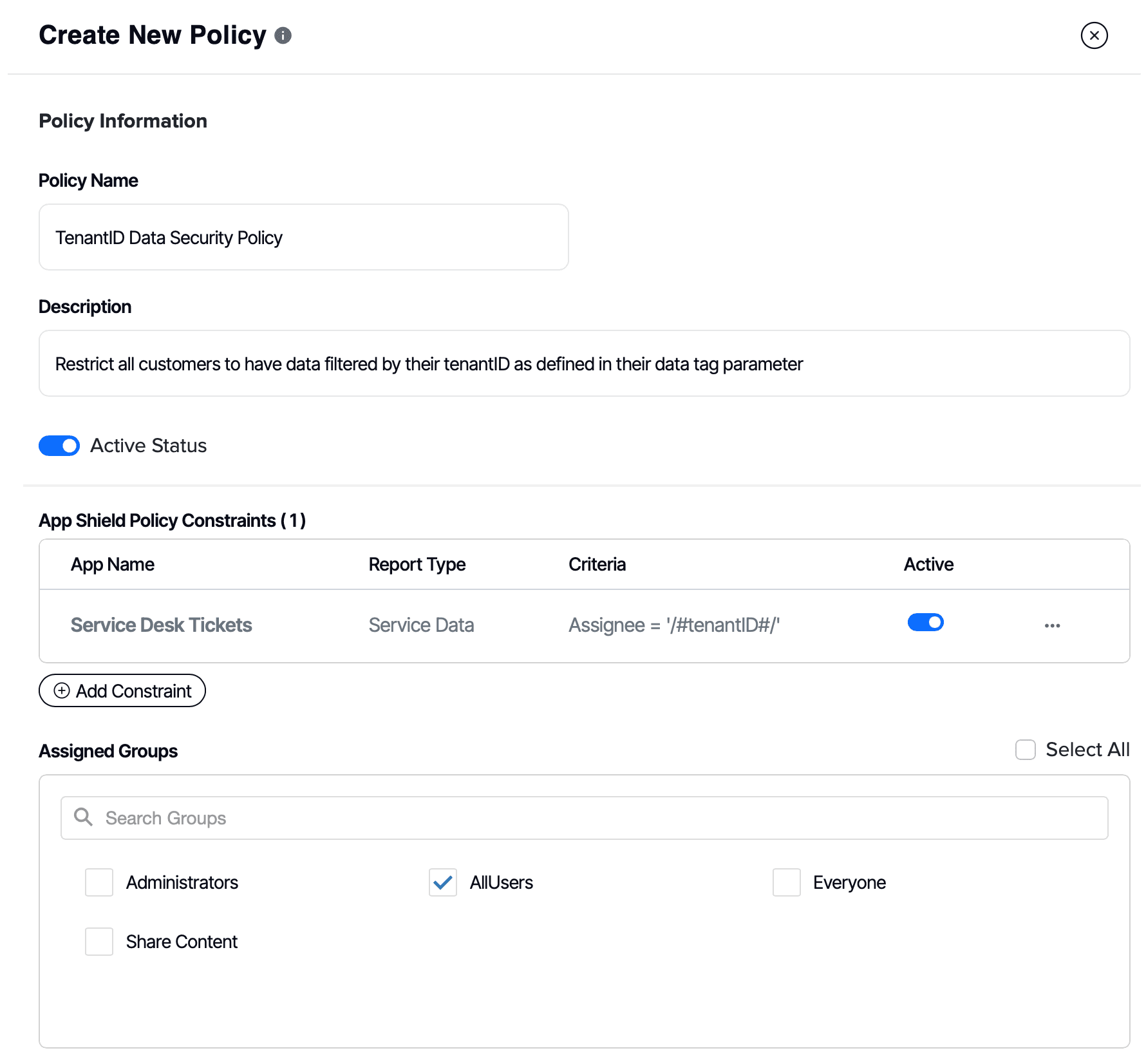
App Shield is Yurbi's field-level security system. It applies constraints directly at query time — so users only receive the rows they're authorized to see, regardless of how they access the data.
Define the policy
Name the policy, select the data source and report types it applies to, then define field constraints — such as limiting by CustomerID, Region, or a date window like "last 90 days."
Virtual field constraints work on calculated values too — not just raw database columns. No schema changes required.
Assign to groups or users
Attach the policy to one or more security groups. Users in that group automatically receive the data restrictions — no per-report assignment needed.
Policies can overlap: a user in multiple groups gets the cumulative constraints of all applicable policies.
Applied at query time — automatically
When a user runs a report, Yurbi embeds the policy constraints directly into the SQL query. Only the permitted rows are fetched from the database — not filtered after the fact.
This means there's no back door. Even if a user somehow accesses a report directly, the data restriction is enforced at the database call.
Test it inside your own perimeter.
See how Yurbi's security model works in your environment. Download the trial and run it on your own server — no cloud, no data leaving your infrastructure.
Additional safeguards built into the platform.
Max Records Cap
Set a platform-wide limit on how many rows any query can return. Protects your database from runaway queries when users forget to apply date or category filters. Configurable in Settings → Server Settings.
Audit Logging
Track logins, login failures, report creation, edits, deletions, group changes, and more. Configurable retention periods. Stored inside your Yurbi installation database — never sent externally.
Guest View Licenses
Share specific reports publicly — or embed them in portals like SharePoint — without requiring a Yurbi login. Guest licenses are scoped per report and fully auditable. App Shield does not apply to guest views by design.
Network, OS, and firewall — that's your territory.
Because Yurbi runs inside your infrastructure, the perimeter security controls — firewall rules, OS hardening, network segmentation, TLS configuration, patching cadence — are entirely in your hands.
This is the model enterprise security teams prefer. You're not trusting a vendor's infrastructure posture. You're applying your own standards, your own tools, and your own audit trail.
Implementation Guide →
What you can tell your customers' security team.
When you embed Yurbi, your customers' questionnaires ask about your product — not ours. These are the answers the self-hosted model makes short.
“Does this add a new subprocessor?”
No. Yurbi runs in your environment. 5000fish never receives, stores, or processes your customers' data.
“Where is our data stored?”
Where it already lives — in your database. Yurbi queries at runtime and keeps only configuration and metadata.
“Can the analytics tool change our data?”
No. Yurbi connects with read-only database credentials you control.
“How is one customer kept out of another's data?”
Tenant Mode plus App Shield policies, enforced inside the SQL query itself.
“Is access logged?”
Yes. Logins, failures, report activity, and group changes, stored inside your environment.
“Who controls network, TLS, and patching?”
You do. Your firewall, your OS standards, your patching cadence.
Common security questions.
No — when Tenant Mode is enabled and App Shield policies are correctly configured, each tenant sees only their own data, security groups, and contacts. App Shield constraints are applied at the database query level, not as a post-query filter, so there's no code path through which Tenant A could receive Tenant B's rows.
No. Yurbi does not make outbound connections to 5000fish infrastructure. Licensing validation, telemetry, and usage reporting are not part of the product design. This makes air-gapped and fully offline deployments supported out of the box.
No. Yurbi is read-only by design — there is no functionality to write back to your application database. We recommend using read-only database credentials as an additional safeguard, so both layers of protection are in place.
Yurbi stores only configuration and metadata: user accounts, security groups, permissions, report and dashboard definitions, the Yurbi App (semantic layer), and App Shield policy configurations. Your actual database records are queried on demand at runtime and never persisted inside Yurbi. Audit log entries are also stored in the Yurbi installation database.
In Server Settings, enable SSO and specify the header field name your SSO tool will inject. When a user reaches sso.html with that header present — rewritten by tools like BMC SSO, CA Siteminder, or Azure Application Proxy — Yurbi reads the username from the header and authenticates them automatically. No password prompt, no redirect to a Yurbi login screen.
The most common pattern for embedded ISV deployments: assign your customers Agent role so they can view, schedule, and export — but cannot modify or build reports. If you want to offer self-service analytics where customers can build their own reports, assign Builder. Reserve Architect and Admin roles for your own internal team only.
Audit Options (Admin → Settings → Audit Options) lets you enable logging across categories: logins, login failures, report creation, report execution, group management changes, and more. Each category can be toggled independently. Retention periods are configurable. Audit data is stored in your Yurbi installation database and can be queried and reported on directly using the Yurbi App built for audit reporting.
Yes. App Shield constraints are applied at query time regardless of how a report is triggered — whether run interactively, scheduled as an email delivery, exported to PDF or Excel, or embedded via iframe. There is no way to bypass App Shield by accessing a report through a different delivery mechanism.
Yurbi doesn't have a SOC 2 report, and for self-hosted software it generally isn't the relevant control. SOC 2 audits a vendor that hosts or processes customer data. Yurbi isn't hosted by 5000fish — it runs inside your environment, and your data never reaches us. The controls a reviewer cares about (hosting, network access, encryption, patching) are yours, covered by your own policies and audits. If a customer's questionnaire asks about the Yurbi software itself, talk to us.