Your customers have seen what AI can do, and they're starting to ask why the reporting inside your product can't do it too. You'd like to say yes. But you also know what comes with it: a vendor who wants your customers' data, a bill you can't predict, and a security review asking where every tenant's records go.
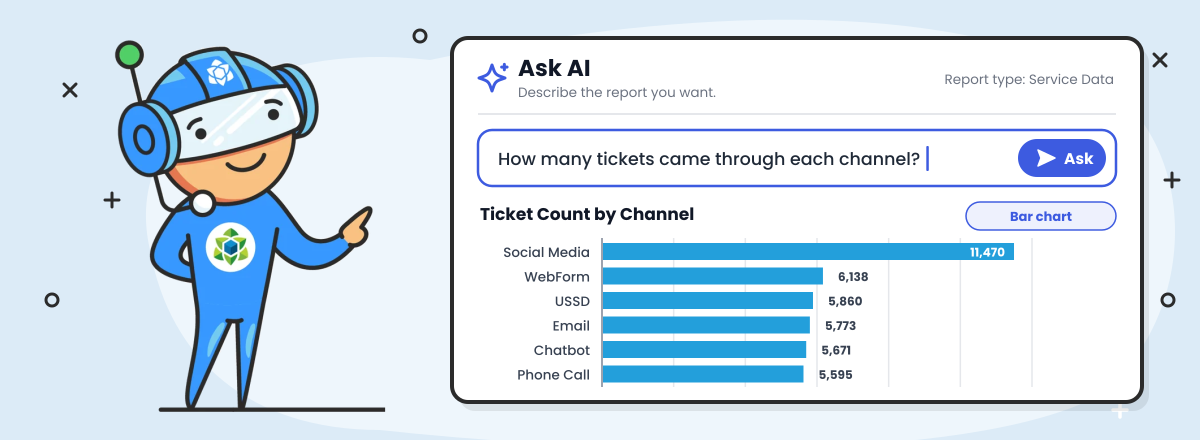
The short answer: Yurbi now includes Ask AI. A user types a question in plain language and Yurbi builds a real report, as a data grid, KPI card, chart or pivot, that runs under the same permissions, Tenant Mode and App Shield policies as a report built by hand. It runs on your own AI provider and key, report results are never sent to the model, and requests go from your server to your provider without passing through us.
How it works
In the report builder, the user picks an App and a report type and opens Ask AI. They pick one of the suggested questions or type their own, and can type @ to name an exact field.
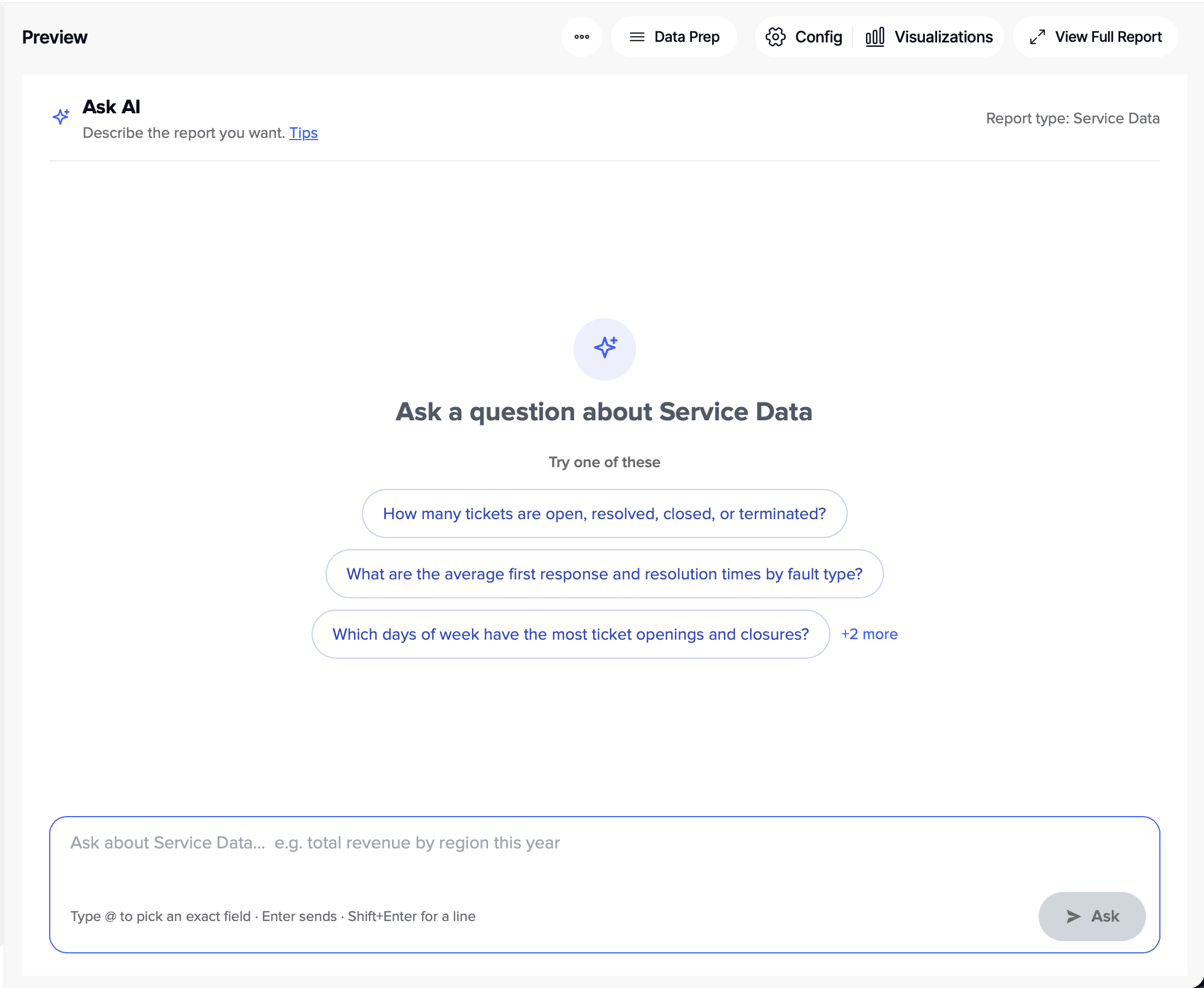
The AI doesn't query your database and doesn't write SQL that gets run as-is. It returns a short, strictly checked description of a report: which fields, filters, sorting and chart. Yurbi checks that description against what the user is allowed to see, then builds and runs it with its own engine, as that user. The answer comes back with a plain-words summary of what it was built with, a suggested chart, and a reminder to check the numbers.
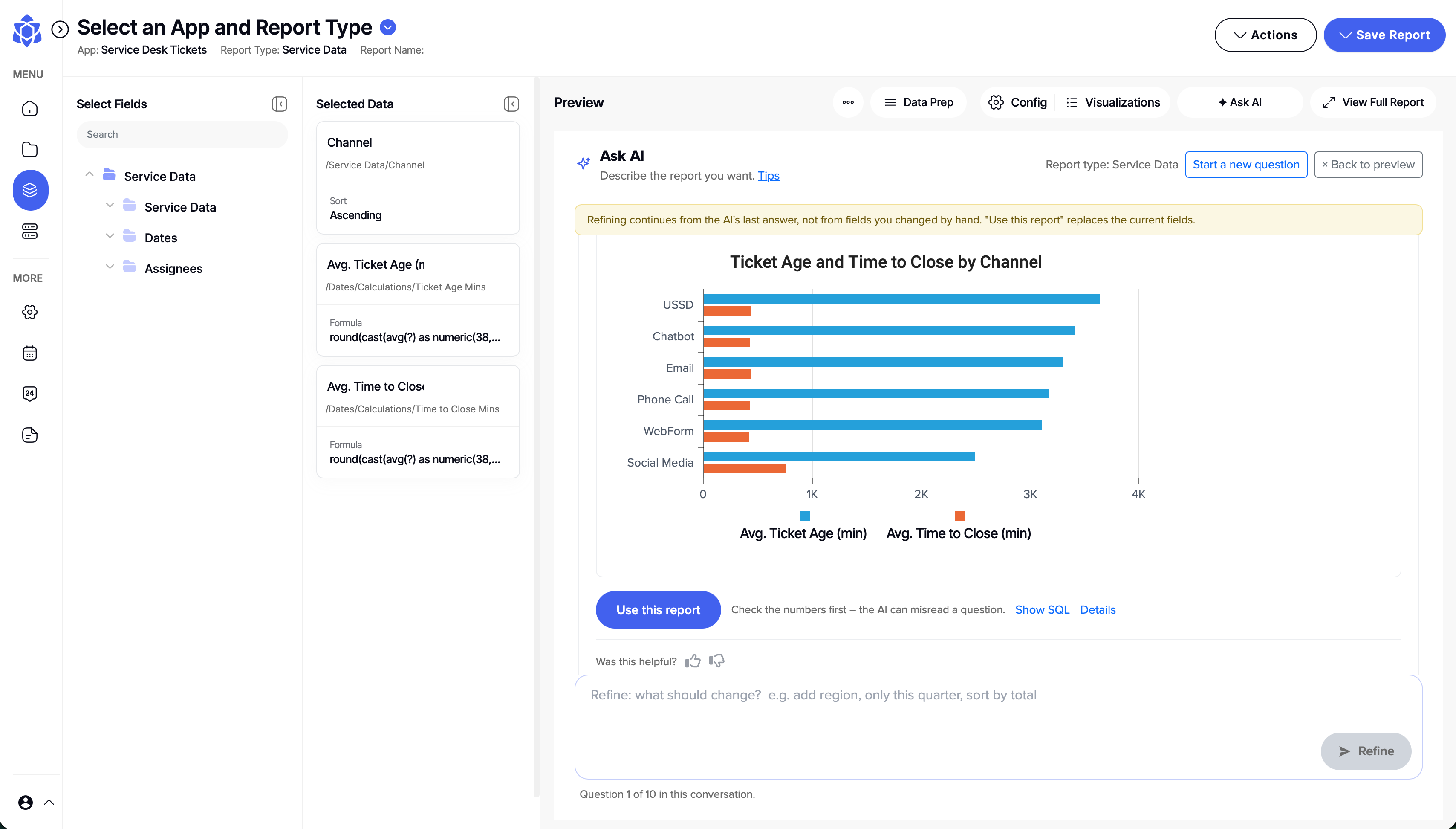
From there the user refines it ("only this quarter", "top 10", "make it a line chart") or clicks Use this report to turn it into an ordinary report they can edit, save, schedule and embed. Users you allow to see SQL can open the SQL behind it.
Built for the way vendors use Yurbi
Your tenant security, unchanged
Because every answer runs as the user who asked, Ask AI can't reach data that user couldn't already see. App Shield policies and Tenant Mode apply as they do to every other report, hidden fields are never usable, and every formula the AI writes passes a read-only safety check that blocks writes and access to tables your App doesn't expose. There's no second security model to configure or explain in a questionnaire.
Your AI key, or your customer's
You connect your own provider: Anthropic, OpenAI, Google Gemini or any OpenAI-compatible endpoint. Providers are assigned per App, group or user, so one customer can run on its own vendor, key and bill while another uses yours. Yurbi reads each provider's current model list, so a new model is available the day the vendor releases it, without a Yurbi upgrade.
A budget per App
A few cents per question on a mid-priced model, and less with prompt caching. Cost depends on the size of the report type, not on how much data you have. You pay your AI vendor directly, with no mark-up, and every call is logged with its tokens and, once you enter your vendor's prices, its estimated cost. Each App has its own daily token limit and each conversation has a question limit, so a busy tenant can't run up an open-ended bill. As a rule of thumb, 100 questions a day is about 1.6 million tokens; on a mid-priced model that is roughly $2 to $6 a day.
Every call on the record
The Audit tab under Settings → AI Query records every call: the user, the App, the report type, the model, tokens in, out and cached, estimated cost, the outcome and the user's feedback. The new audit trail records AI questions answered and AI reports saved alongside everything else, so "who used AI on Acme's data last month?" has an answer.
Inside your product
Users who hold a Builder role can use Ask AI today in the embedded report builder, and the panel takes its colors from your theme. If your customers' users are mostly view-only Agents, an Ask AI experience made for them, and cleaner to embed than the full builder, is on our roadmap for early 2027.
Where your customers' data goes
Yurbi runs on your servers, so Ask AI does too. When a user asks a question, the request goes from your server straight to the AI provider you configured. It doesn't pass through 5000fish, and we never see the questions, the answers, your keys or the AI audit.
Your report results are never sent to the AI provider. By default the model sees structure — table and field names and descriptions — plus your question. You control whether any stored values are shared, and Strict Privacy mode blocks all database values. The question a user types is always sent, so your own customer terms should say so. The AI privacy and security page lists every case, field by field.
If even the question can't leave your network, point Ask AI at a model you host yourself through any OpenAI-compatible endpoint, with your own base URL, headers and CA certificate. Keep in mind that small local models produce noticeably weaker reports than an everyday hosted model.
What your customers can ask
Ask AI handles the questions people actually ask of operational data: totals and counts, top 10s, monthly trends, this month against last month or year to date against last year, average hours between two dates, activity by day of the week or hour of the day, shares of a total, and crosstabs. It can break a change down to show where it came from: "why did tickets rise last month?" returns the comparison by category with the biggest movers first. It shows where the change happened, not why.
It also works on the reports you've already built. Ask AI can answer questions about the result of an existing report, including the complex, hand-written SQL reports most vendors have accumulated over the years. The report runs once as the user, and the questions are answered from that copy.
Users can ask about the data itself, too: "what can I ask?", "which fields are there?" or "what does Net Revenue mean?". Ask AI doesn't forecast, and it can't change data.
Get started
- Upgrade to the latest release. AI stays off until you turn it on.
- In Settings → AI Query → Providers, add a provider and key, pick a model and press Test. The model builds a report on built-in sample data, using none of yours. To choose between models, Compare models puts your users' recent questions to each one and shows which build valid reports, how fast and at what token cost.
- In Settings → AI Query → Apps, turn AI on for the Apps you want and set the daily token limit.
- Have an Architect open Prepare for AI on your most-used report types: add descriptions and sample questions, and choose how each field's values may be used. It's optional, and it's the biggest lever on answer quality.
- The admin guide in Getting Started walks you through "Add an AI provider" and "Turn AI on for an app".
- New to Yurbi? Start a free trial or book a demo and we'll show Ask AI running on a multi-tenant App.
What's next
- Ask AI for Agents (early 2027): your customers' view-only users ask questions of the reports and datasets they're already allowed to run, in an experience built for embedding.
- An AI assistant across the product (early 2027): plain-language commands such as "create a dashboard" or "add a filter".
- A Yurbi MCP server (spring 2027): connect AI assistants and agents that support the Model Context Protocol to Yurbi.
Learn more on the Yurbi AI page, and see what a question costs on AI cost. If a customer's security review asks something about Ask AI that this doesn't answer, send us the question.
Frequently asked questions
Does Yurbi have an AI report builder?
Yes. Ask AI is built into the Yurbi report builder. A user asks a question in plain language and Yurbi builds a real report, as a data grid, KPI card, chart or pivot, that can be checked, refined, saved, scheduled and embedded like any report built by hand.
Does Ask AI respect multi-tenant security?
Yes. The AI only describes the report. Yurbi's own engine builds and runs it as the user who asked, so permissions, Tenant Mode and App Shield policies apply exactly as they do to a report built by hand.
Is my customers' data sent to the AI provider?
Report results are never sent. By default the model sees structure, such as table and field names and descriptions, plus the question. You control whether any stored values are shared, and Strict Privacy mode blocks all database values. The question a user types is always sent, directly from your server to your provider, and nothing is sent to 5000fish.
Can each customer use its own AI provider and key?
Yes. AI providers are assigned per App, group or user, so a customer can run on its own vendor, key and bill. Each App also has its own daily token limit.
Can I offer Ask AI inside my embedded product?
Yes, to users who hold a Builder role, by embedding the Yurbi report builder. An Ask AI experience for Agents, your view-only users, built for cleaner embedding, is planned for early 2027.
Which AI providers and models work with Yurbi?
Anthropic, OpenAI, Google Gemini or any OpenAI-compatible endpoint, including a model you host yourself inside your own network.
What does Ask AI cost?
Yurbi doesn't charge for AI usage. You pay your AI provider directly, typically a few cents per question on a mid-priced model, and less with prompt caching.
Stop rebuilding your reporting layer.
Embed Yurbi into your product and ship analytics to your customers in weeks — not quarters. Self-hosted, white-labeled, flat annual pricing.
Download Free Trial See a Live DemoStartup or small software vendor? Ask about startup pricing →